
Appearance
Your purchase code
Replora asks for the purchase code of your license once, during installation. The code is checked with our license server, which then sends the Replora modules to your server. After that, updates use the saved code by themselves.
You enter the code in one of these places:
- Web installer: the second step, Purchase code (after the server check). See Shared hosting.
- Command line:
php artisan replora:install --purchase-code=YOUR-CODE. See Command-line install. - Later, on the System page: the License card (Administration › System), for installations that skipped the step or to change the code.
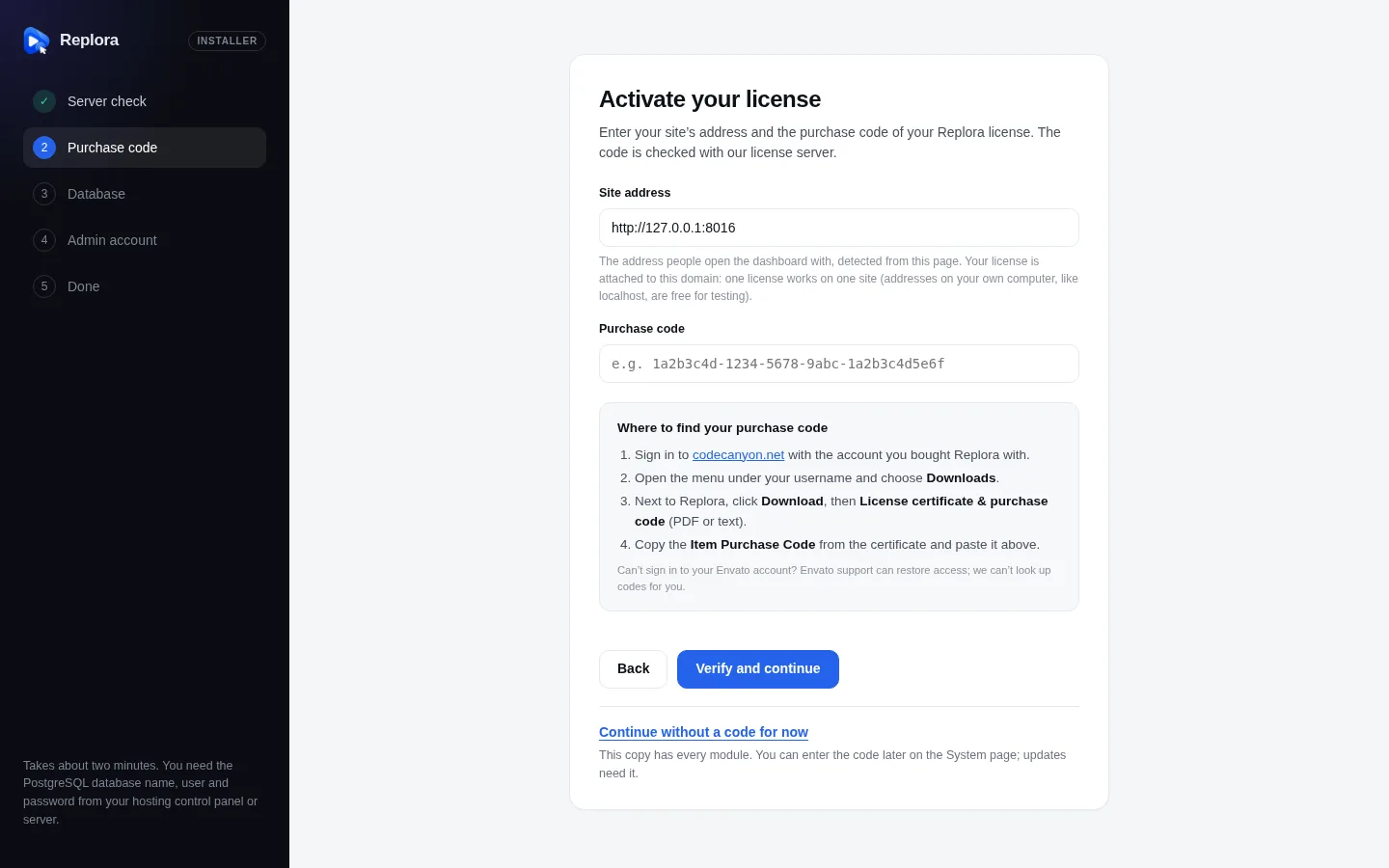
1. Installer stepsServer check, Purchase code, Database, Admin account, Done. A step opens only when the steps before it are done.
Where to find it
- Sign in to codecanyon.net with the account you bought Replora with.
- Open the menu under your username and choose Downloads.
- Next to Replora, click Download, then License certificate & purchase code (PDF or text).
- Copy the Item Purchase Code from the certificate. It looks like
1a2b3c4d-1234-5678-9abc-1a2b3c4d5e6f.
Paste it as it is: spaces and line breaks are removed. A code is made of letters, digits and dashes (4 to 64 characters); anything else is refused before it is sent.
Can't sign in to your Envato account?
Envato support can restore your access. We can't look up purchase codes for you.
One license, one site
A purchase code works on one domain. The installer sends the site address together with the code; it is filled in from the address you opened the installer at, and it must be that address (Open this installer at the site’s own address and use that address here…). The first time a code is used on a public domain, the license is attached to that domain:
- Reinstalling, updating and repairing on the same domain always works (the port doesn't matter).
- On any other domain the code is refused with This purchase code is already used on example.com, naming the domain it belongs to. This applies to new installations and to updates of a copied or moved site.
- Addresses on your own computer (
localhost,127.0.0.1and similar local addresses) are free for testing and are never attached. - Moving to a new domain? Contact our support with your purchase code: we reset the domain, and the next installation or update attaches the code to the new one.
Only the code, the product name, the Replora version and the site's host name are sent to the license server. Nothing about your visitors or recordings ever is.
Single site and SaaS codes
Codes belong to a plan: Single site or SaaS.
| Files you install | Single site code | SaaS code |
|---|---|---|
Single user package (replora-single-…zip) | Accepted | Accepted |
SaaS package (replora-saas-…zip) | Refused: This purchase code is for Replora Single site. | Accepted |
The SaaS package refuses Single site codes even if you then choose the Single user edition in the installer. Install the Single user files you downloaded with that code instead, or upgrade your license.
Modules from the license server
The release zip contains the framework, the dashboard and the Installer, but not the Replora modules (Recordings, Heatmaps, Funnels, Forms, Surveys, Experiments and the others: every folder of modules/ except Installer). They are the core pack. When your code is accepted, the license server sends a download link for this version's pack that works once, and the installer fetches, checks and installs it by itself:
- The pack is signed. Replora installs it only when its Ed25519 signature matches the key built into the application, so nothing else can be slipped in.
- Each check issues a new link, so if a download fails you simply click Verify and continue again.
- Your server needs outgoing HTTPS access to
altara.digital, the PHP extensionszipandsodium, and the web server must be able to write to themodulesfolder. - The SaaS-only modules in
saas/modulesare part of the SaaS zip; they are not downloaded.
Updates fetch the matching pack of the new version the same way, with the code saved at installation (see Updating). If the module folders were deleted, or not copied to a new server, download them again:
bash
php artisan replora:core                              # with the saved purchase code
php artisan replora:core --purchase-code=YOUR-CODE    # with another code
php artisan replora:core --force                      # install again even when they are current
The License and modules check on the System page fails while modules are missing and asks for attention when some belong to another version.
Bundled builds
A build made with every module inside (for example the one reviewed by Envato) doesn't need the download. Its installer shows Continue without a code for now under the form. You can enter the code later in the License card on the System page; updates need it to fetch the next version's modules.
If the code is refused
| Message | What it means | What to do |
|---|---|---|
| This doesn’t look like a purchase code. | What you entered can't be a purchase code (wrong characters or length). | Copy the code again from the license certificate. |
| This purchase code could not be verified. | The license server doesn't accept the code: it is invalid, has expired or belongs to a different item. | Check that you copied the whole code of your Replora purchase. If it is correct, contact our support with your purchase code. |
| This purchase code is already used on example.com. | The code is valid but attached to another domain (one license, one site). | Install and update Replora on that domain, or contact our support to move the license. |
| This purchase code is for Replora Single site. | You are installing the SaaS package with a Single site code. | Install the Single user package, or upgrade your license. |
| The license server could not be reached. | Your server could not connect to altara.digital (no internet access, a firewall, or a short outage). This says nothing about your license. | Allow outgoing HTTPS requests, then try again. If it keeps happening, contact our support. |
| Your purchase code is valid, but the Replora modules could not be installed. | The code is fine; downloading or installing the modules failed. The message says why. | Fix what it names and click Verify and continue again: you get a new download link. |
The reasons that can follow the last message:
| Reason | Fix |
|---|---|
| The PHP extension … is needed to install the modules. | Enable zip or sodium in the control panel (PHP settings). |
| The web server can’t write to the folder modules. | Give the web server write access (permissions 775). |
| The modules could not be downloaded. Make sure this server can connect to the internet… | Allow outgoing HTTPS to altara.digital. |
| The download link has expired or was already used. | Try again: each check issues a new link. |
| The downloaded modules failed the security check and were not installed. | Try again; if it repeats, contact support. |
| The license server has no modules for version … yet. | Your files are newer than any pack on the server. Contact support. |
| The modules are already being installed. Wait a minute, then try again. | Another request is installing them (a double click, a second tab). |
Your license in the dashboard
Administration › System › License shows the saved purchase code, its plan, the support period (Active until … or Ended) and when it was last checked, with Change the purchase code. Without a code it shows a field and Activate. The License and modules service check says Purchase code saved (saas), support until …, or reminds you when no code is saved or support has ended (updates keep working after support ends).
Where the code is kept
In storage/app/replora-license.json (with the site address, the plan and the support end) and in the installation marker storage/app/replora-installed.json. Both are inside storage/, so copy that folder when you move or restore a site. Keep the license certificate too: our support asks for the code.