
Appearance
System: version, license & updates
System is where administrators look after the installation itself: which version runs and which version the database belongs to, updates (check, install with one click, finish an update uploaded by hand, or put the previous version back), the purchase code with its plan and support, and — further down — the service status and maintenance mode.
Where: sidebar › Administration › System (/system). The blue update notice on other pages also leads here.
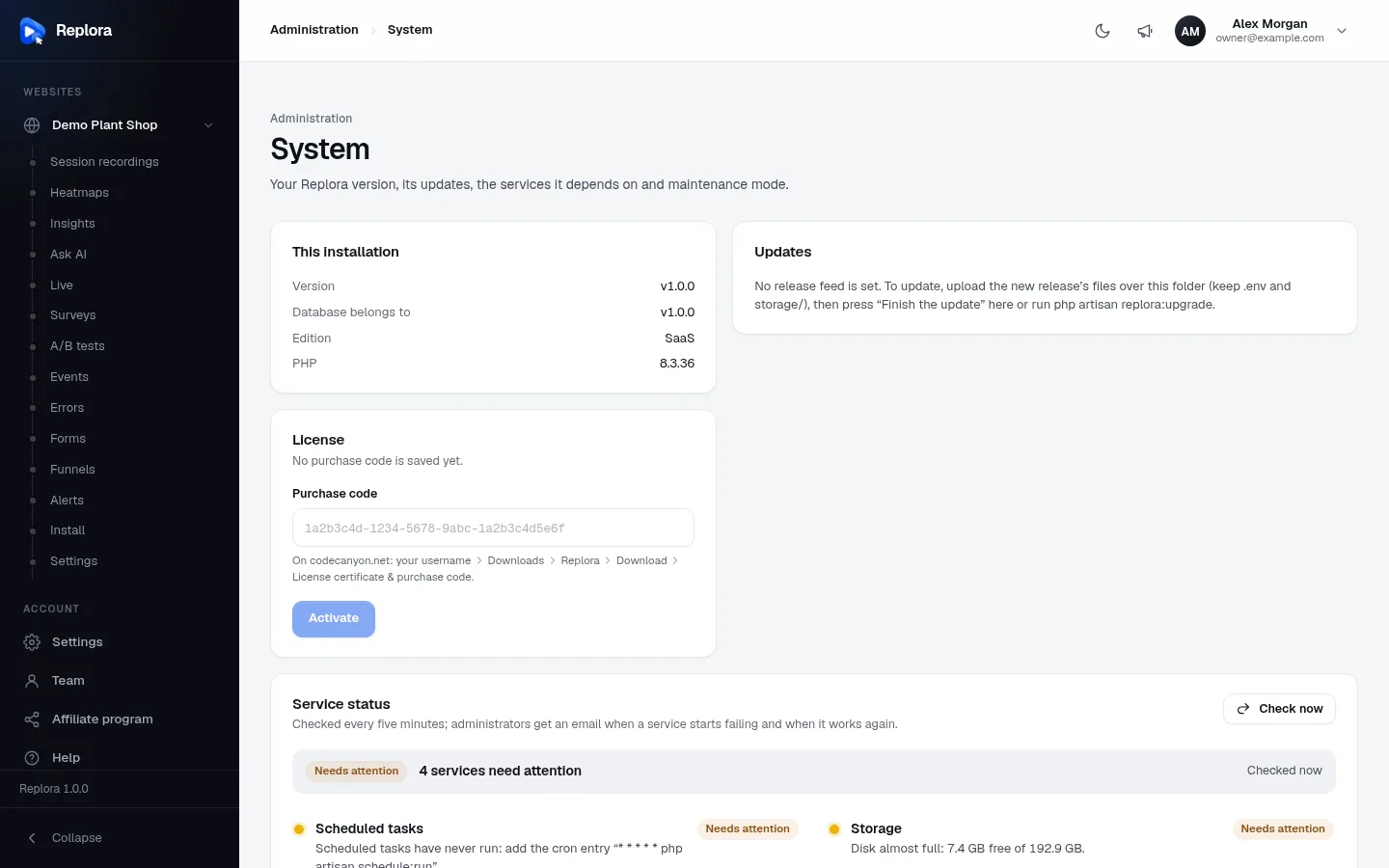
1. This installationVersion of the files, version of the data, edition and PHP version.
This installation
| Row | Shows |
|---|---|
| Version | The version of the files that run now (from the VERSION file), e.g. v1.0.0. |
| Database belongs to | The version the database was last brought up to. Equal to Version when everything is finished; older right after new files were uploaded; – before the first upgrade. |
| Edition | Single user or SaaS (Editions). |
| PHP | The PHP version the web server runs. |
Updates
What the Updates card shows depends on how the installation gets its releases.
Without a release feed
When REPLORA_UPDATE_FEED isn't set (the default for a downloaded copy), the card says:
No release feed is set. To update, upload the new release's files over this folder (keep .env and storage/), then press "Finish the update" here or run php artisan replora:upgrade.
See Updating & rolling back for the upload steps.
With a release feed
One-click updates need a release feed (REPLORA_UPDATE_FEED, the address where releases are announced) and the release key (REPLORA_UPDATE_KEY, the public key release signatures are checked with). Both are .env settings (Environment).
| Element | What it does |
|---|---|
| Check now | Asks the release feed at once (otherwise the answer is remembered for 12 hours). A message says Version X is available or You have the latest version. If the feed can't be read you see the reason (e.g. The release feed could not be reached: …). |
| Up to date | v1.2.0 is the latest release., or Not checked yet. |
| New · Replora X | A newer release: its date and its release notes. |
| Update now | Installs the new release (see below). While it runs the button reads Installing the files…, then Updating the database…. |
| One-click updates can't run here: … | Shown instead of Update now when something is missing; the reason says what (see the table below). Upload the files by hand instead, then Finish the update. |
What Update now does, in order:
- Downloads the release (at most 300 MB) and checks its SHA-256 checksum and its Ed25519 signature with the release key. A release that doesn't match is refused: Nothing was changed.
- Checks that the release is complete, is the version announced, contains no unsafe paths, and that this server's PHP is new enough for it.
- Moves the current files to a backup (
storage/app/updates/backup-<version>-<time>) and puts the new ones in place..env,storage/and your own modules (module folders the release doesn't have) stay. The two newest backups are kept. - Finishes the update in a fresh request: downloads the new version's modules when the release leaves them out (needs the purchase code), runs the database changes and upgrade steps, and clears the caches.
- Shows Updated from vX to vY: N database changes, M upgrade steps. Reloading… and reloads the dashboard.
Recordings, settings and accounts are not touched. Only one update can run at a time (An update is already running. Wait for it to finish.).
| Reason one-click updates can't run | Fix |
|---|---|
| No release feed is set (REPLORA_UPDATE_FEED). | Set the feed in .env, or update by uploading files. |
| No release key is set (REPLORA_UPDATE_KEY). | Set the key in .env. |
| The PHP zip extension is missing. | Install php-zip. |
| The PHP sodium extension is missing. | Install/enable sodium. |
| The application folder is not writable by the web server. | Give the web server user write access, or update from the command line. |
Finish the update
After you upload a new release's files by hand, the database still belongs to the old version. The card then says New files are in place. Finish the update so the database matches them; the site keeps running. — press Finish the update. It does step 4 above. The same thing on the server: php artisan replora:upgrade.
Files older than the data
If you upload files that are older than the database (These files are older than your data (vX). Upload version vX or newer.), nothing can be finished: put the newer files back. Replora never runs an older version on newer data.
Put the previous version back
When a backup exists, the card ends with Something wrong after an update? Put the previous version back. After you confirm (Roll back):
- the files of the newest backup replace the current ones (your own modules stay);
- the database changes of the update stay — the older code ignores the newer tables, and updating again later simply skips those changes;
- the dashboard finishes like an update and reloads; a message says Version X is back.
Use it only right after an update that went wrong. On the server: php artisan replora:update --rollback. More in Updating & rolling back.
License
The License card holds the purchase code this site runs with.
| Element | What it shows or does |
|---|---|
| Headline | No purchase code is saved yet.; This copy runs without a purchase code. Enter it so updates can bring new modules. (builds that don't require one); Purchase code 1a2b…5e6f is saved for this site.; or Missing modules: N. Enter your purchase code to download them. |
| Plan | Single site, SaaS or the plan name the license server gave. |
| Support | Active until a date, Ended with the date, or — when unknown. Updates keep working after support ends. |
| Last checked | When the license server last confirmed the code. |
| Modules notice | Some modules belong to another version: press "Finish the update" to get the matching ones. (or, without a code: enter your purchase code below…). |
| Purchase code / Change the purchase code | The code from your license certificate. Hint: On codecanyon.net: your username › Downloads › Replora › Download › License certificate & purchase code. |
| Activate / Check and save | Checks the code with the license server for this site's address and saves it. Enabled from 4 characters. |
The full code stays on the server; the card only ever shows its first and last four characters. When the code brings missing or newer modules, they are installed and the dashboard reloads to run them.
| Message | Meaning |
|---|---|
| This doesn't look like a purchase code. Copy it from your license certificate. | Not in the purchase-code format. |
| This purchase code could not be verified: it is invalid, has expired or belongs to a different item. | The license server refused it. |
| This purchase code is already used on {domain}. A license works on one site; our support can move it to this site. | One license, one site. |
| The license server could not be reached. Make sure this server can connect to the internet, then try again. | No outgoing connection. |
| This purchase code is for Replora Single site; the SaaS edition needs a SaaS license. | The SaaS edition accepts only SaaS codes. |
| The license server has no modules for this version yet. Please contact our support. | Modules are needed but none are offered. |
Saving the code is limited to 6 tries a minute. More: Your purchase code.
Check and update
- Open System. Read Version and Database belongs to.
- Press Check now in Updates.
- If a release is shown, read its notes and press Update now. Keep the tab open until the page reloads.
- Check Service status further down after the update.
Related
- Service status & maintenance — the lower half of this page
- Updating & rolling back — uploading by hand, the command line
- Your purchase code
- Commands —
replora:update,replora:upgrade,replora:core - Backups & moving servers