
Appearance
Public website
The SaaS edition comes with a complete public website for your Replora service: a home page, a page for every feature with animated demos, a pricing page built from your plans, a contact form and your own pages. It is translated into every language of the installation. You don't build it: you change its texts, links and search settings from the dashboard.
Available inSingle userSaaSWithout the SaaS edition, / opens the sign-in page.Where: the website is at your site's root (https://YOUR-SITE/). You change it in Settings › Installation (Website texts, Social links, Company details), in Settings › General › Website and SEO (administrators), on Administration › Website pages (Website pages & SEO) and on the Plans page (prices).
The pages
| Page | Address | What it shows |
|---|---|---|
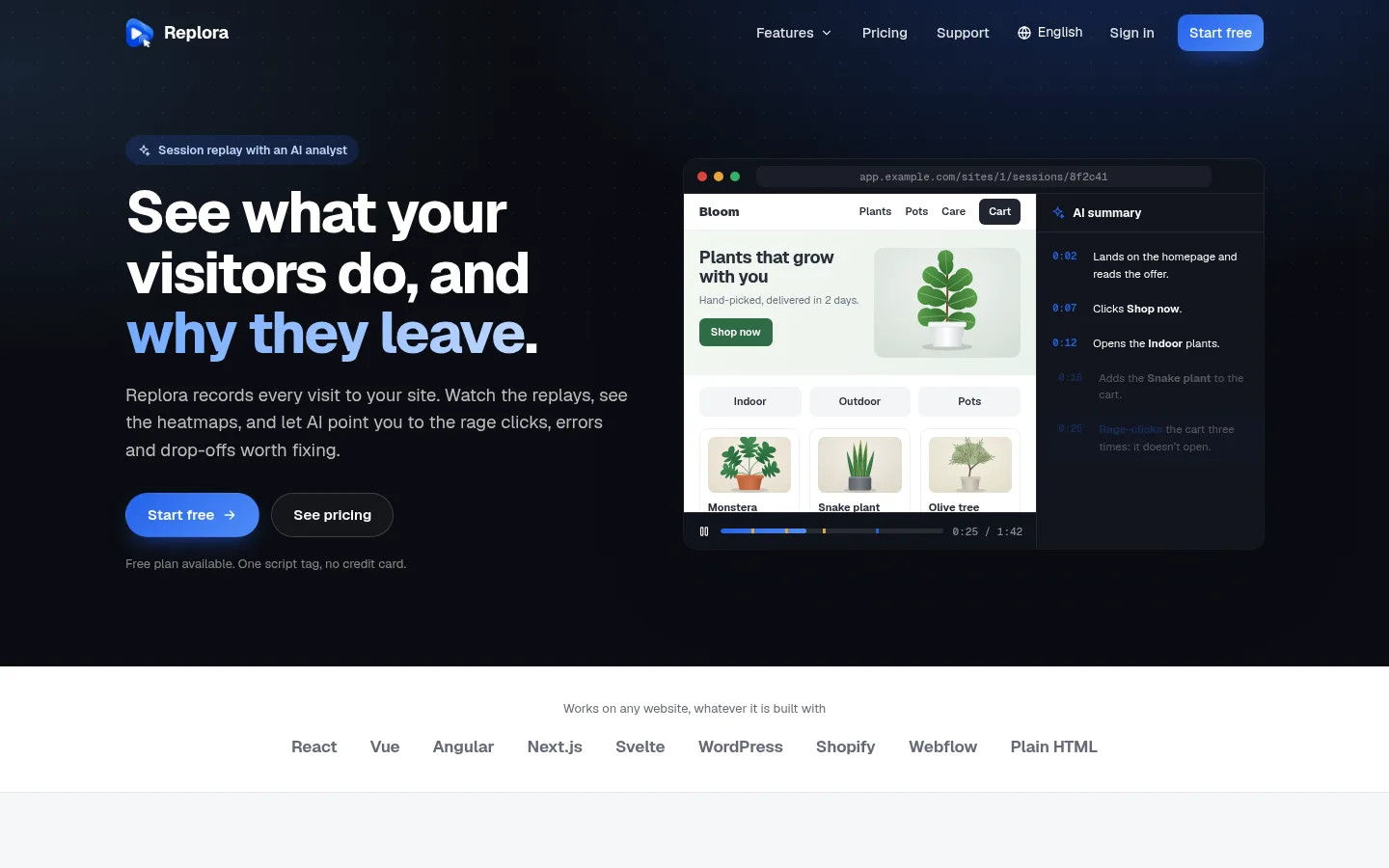
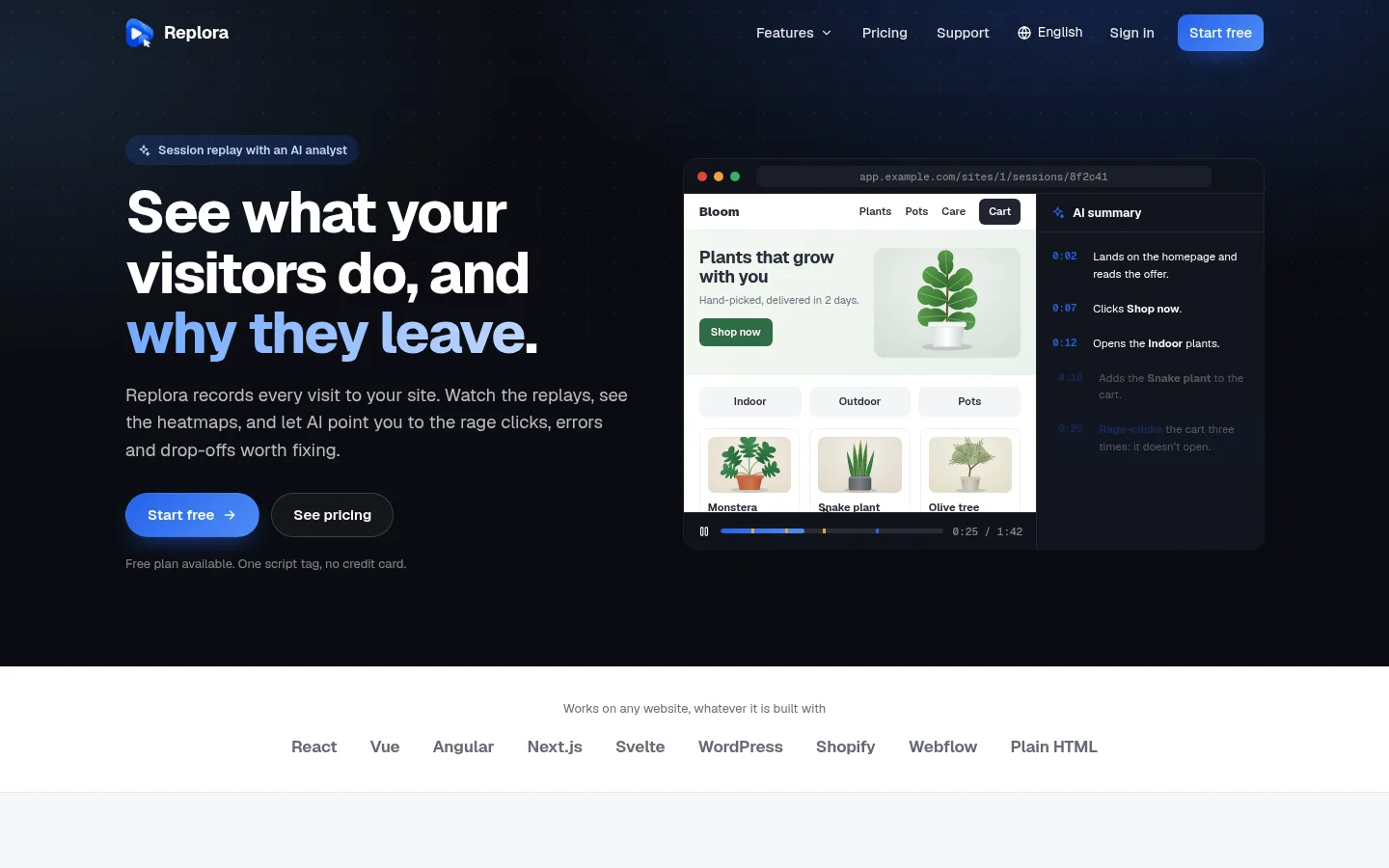
| Home | / | Hero (headline, introduction, Start free, then Try the live demo when a demo site is set, else See pricing), the "works on any website" strip, session replay / funnels / heatmaps / form analytics rows with demos, the AI section (insights, recommended sessions, Ask AI), every feature as a card, the privacy section and a closing call to action |
| Feature pages | /features/{feature} | One page per feature with animated demos and "Works even better together": session-replay, heatmaps, form-analytics, funnels, ai-insights, session-insights (Recommended sessions), ask-ai, live (Live view), surveys, ab-testing, error-logging. The header's Features menu lists them in two groups (product and AI) |
| Pricing | /pricing | Your plans as cards, the monthly/yearly switch, enterprise plans, Compare all features and the pricing FAQ. More below |
| Contact | /contact | A contact form. More below |
| Affiliate program | /affiliate-program | The program's terms (commission, cookie window, payouts, minimum) and Become an affiliate. Only while the program is open, else "not found". See Affiliate program |
| Live demo | /demo | Visitors try a demo page and then watch their own replay. Linked from the header, the hero and the footer only when a demo site is set (REPLORA_DEMO_SITE, see Environment) |
| Support center | /support | Linked in the header (Support) and the footer while the support desk is on. See Support desk |
| Your pages | /{address} | Terms, privacy, about us… written on Website pages, placed in the header or footer menu if you like |
Every page has a header (logo, Features, Pricing, your header-menu pages, Live demo, Support, the language switcher, Sign in and Start free) and a footer (your footer text and social icons, the features, a column with Pricing, Contact, Support center, Affiliate program, Live demo, Sign in, Create an account and your footer-menu pages, the copyright line and the language switcher). Signed-in visitors see Dashboard / Open the dashboard instead of the sign-up buttons.
Languages
The language switcher lists every language of the installation in its own name (English, Español, Français, Deutsch, Português, Italiano, Русский, 中文, 日本語, 한국어, Türkçe, Bahasa Indonesia, العربية). The website picks the language in this order: the one chosen with the switcher (?lang=, remembered for a year in a cookie shared with the dashboard), the signed-in person's language, then the browser's. Choosing a language while signed in also changes the dashboard's language. Arabic pages are shown right to left.
All built-in texts are translated. Change any of them, in any language, on the Translations page (area Website).
The pricing page
Everything on it comes from your plans:
| Part | What it shows |
|---|---|
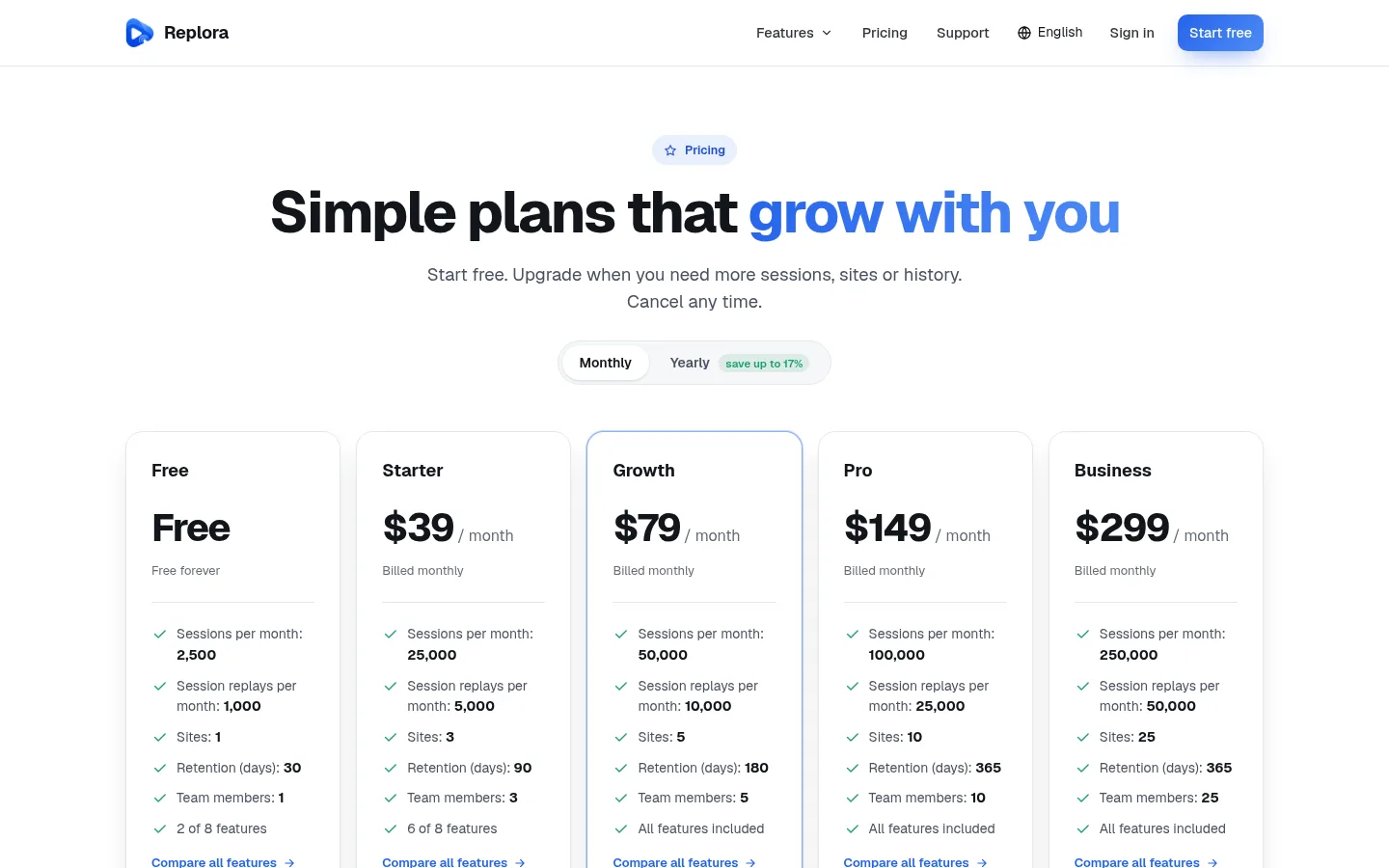
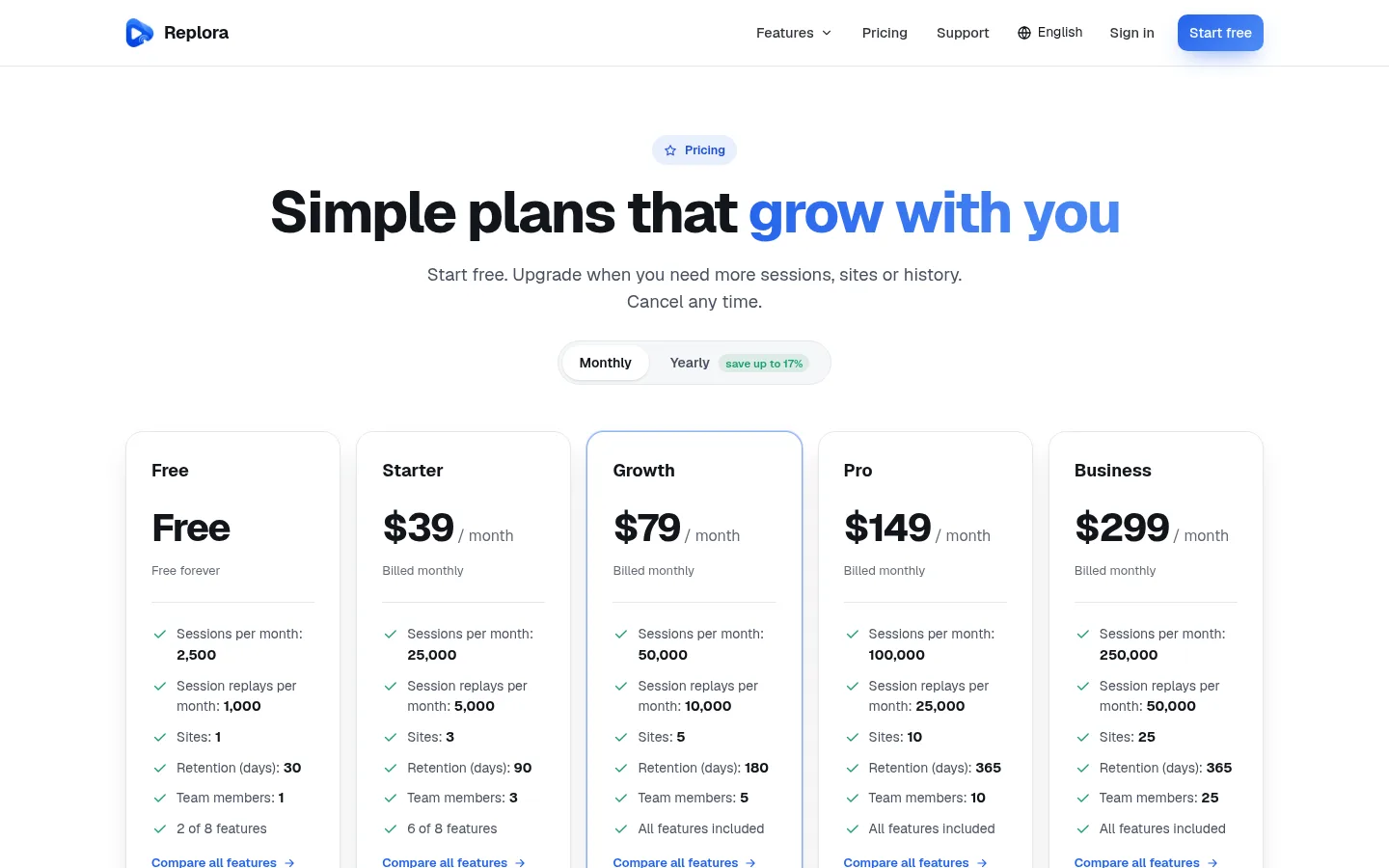
| Monthly / Yearly | Shown when at least one plan has a yearly price. The Yearly button shows the biggest saving ("save up to 17%"). Yearly prices are shown per month, with "Billed yearly, save N%" |
| Plan cards | One per regular plan, in your order: name, "N-day free trial" when the plan is offered as a trial, price ("Free" / "Free forever" for a free plan), then sessions per month, session replays per month, sites, retention (days) and team members (unlimited and 0 shown as such), then "All features included" or "N of M features" for the on/off features |
| Featured plan | The regular plan in the middle of the row gets a highlighted card (and the Most popular badge in the comparison), unless it is the free default plan |
| Buttons | Default plan: Start free. Others: Try Plan free (trial), else Start with Plan; signed-in visitors see Choose Plan and go to their Plan & billing page. Visitors who aren't signed in go to /signup |
| Need more? | Without enterprise plans: a Talk to us band that opens the contact form on Plans and prices |
| Enterprise plans | Plans marked enterprise are listed apart under a heading ("Need more scale?" by default) with their sessions as an eyebrow ("500K sessions"), price or "Custom pricing", key numbers, and Start with Plan / Upgrade (priced) or Contact sales (no price). A last card, Enterprise – Need a custom plan?, links to Contact us |
| Compare all features | Every plan side by side (enterprise plans last), every limit and feature any plan lists. Shown when there are at least two plans |
| FAQ | Eight questions about sessions, limits, speed, single-page apps, privacy, changing plans, data retention and the free plan (translatable texts) |
When no plan exists yet the page says "Plans are being prepared." with a Create an account button.
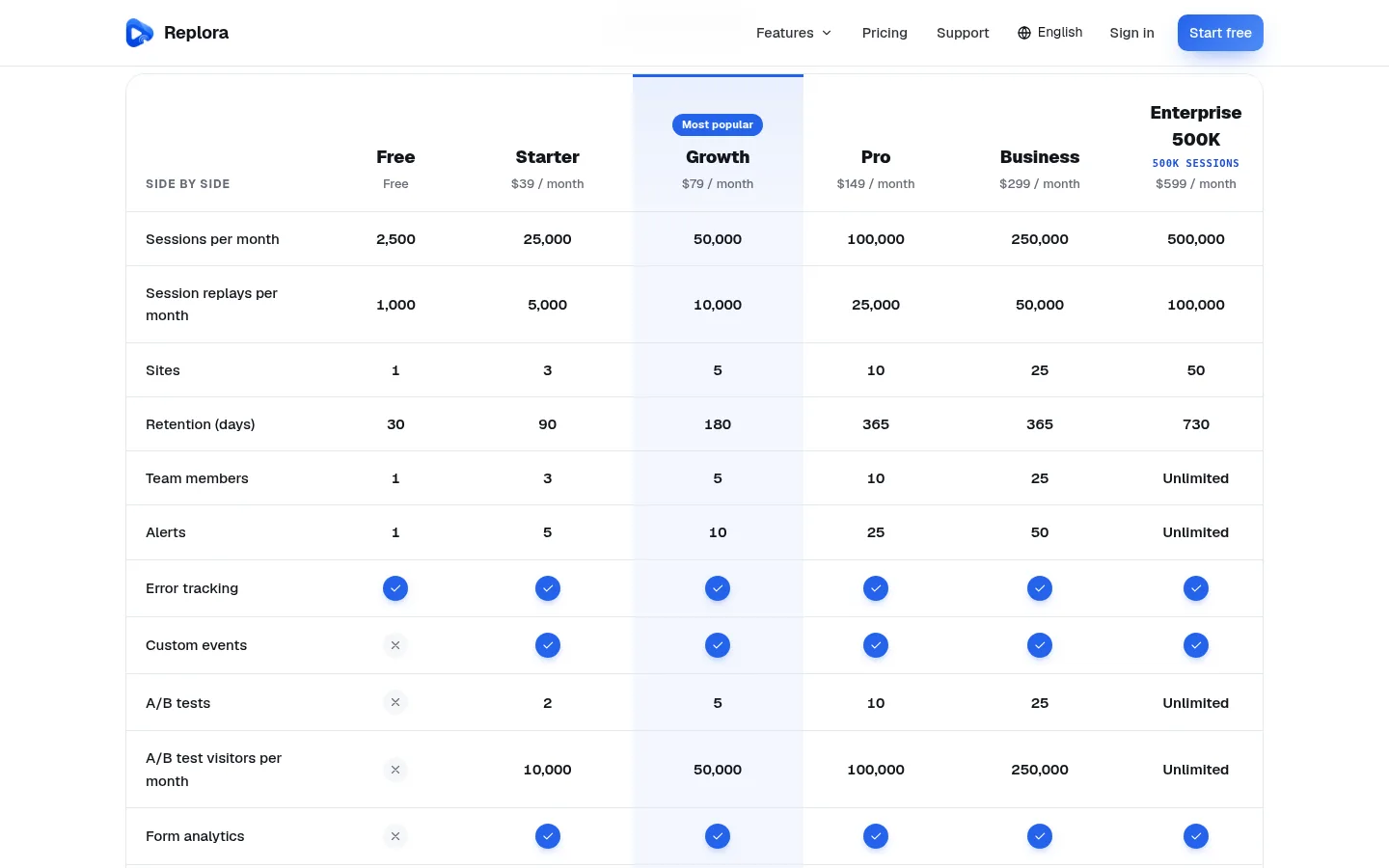
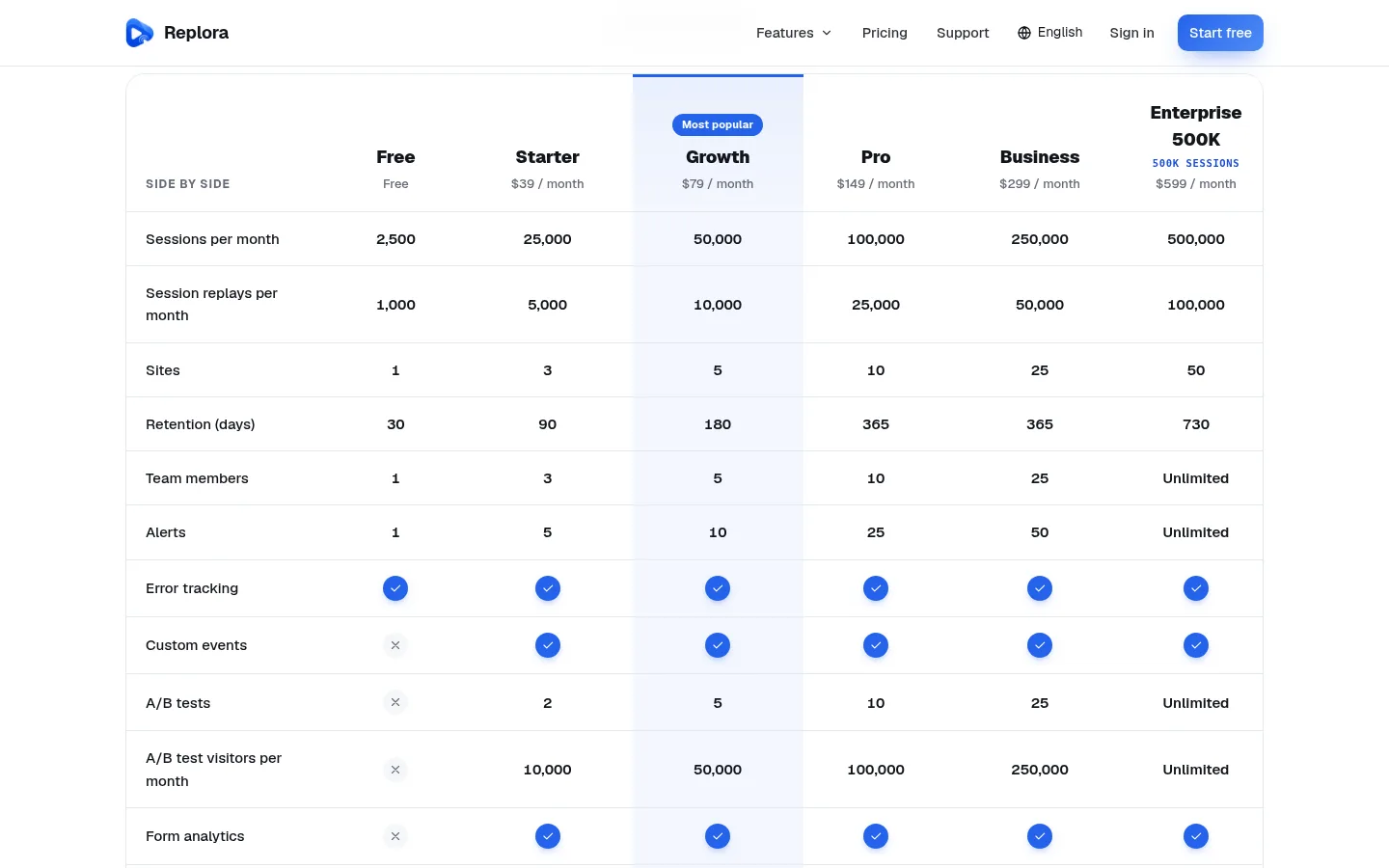
In the comparison, a plan that doesn't list a feature counts as included (on/off features) or Unlimited (numbers). Rows start with the card's key numbers, then the other limits and features in the order of the plan's limits list.
Website texts
Settings › Installation › Website texts. Empty fields use the built-in text, which is translated into every language. In your own texts {app} becomes the product name and {year} the current year. To give your own text a wording per language, translate it on the Translations page (area Website).
| Setting | Where it appears | Built-in text | Limit |
|---|---|---|---|
| Home page headline | The home page's big title | "See what your visitors do, and why they leave." (the last words highlighted) | 120 characters |
| Home page introduction | Under the headline | "{app} records every visit to your site. Watch the replays, see the heatmaps, and let AI point you to the rage clicks, errors and drop-offs worth fixing." | 400 |
| Footer text | Under the logo in the footer | "Session replay, heatmaps, form analytics and AI insights: see what your visitors do, and why." | 300 |
| Copyright line | Bottom of the footer | © {year} {app} | 160 |
| Enterprise heading (pricing) | Above the enterprise plans | "Need more scale?" | 120 |
| Enterprise introduction (pricing) | Under that heading, when there are enterprise plans | "Enterprise plans include all features plus phone support, custom services, and 24 months of storage." | 300 |
Your own headline is not highlighted
The built-in headline colours its last words. A headline you type is shown in one colour.
Social links
Settings › Installation › Social links: one address per network, shown as icons in the footer (opening in a new tab). Leave a network empty to hide it. Addresses must start with http:// or https://, up to 300 characters.
Networks: X, Facebook, LinkedIn, Instagram, YouTube, GitHub, TikTok, Discord.
Company details
Settings › Installation › Company details (company name, country, address, contact email, refund window) are used by the website too: the contact form sends to the contact email and shows it ("You can also write to …"), and the legal page drafts are filled in with these details. See Installation settings.
Website and SEO
Settings › General › Website and SEO (installation administrators only):
| Setting | What it does | Limits |
|---|---|---|
| Site title | Search results and the browser tab of the home page. About 50–60 characters | Up to 70, one line |
| Description | One or two sentences under the title in search results. About 150–160 characters | Up to 300 |
| Keywords | Comma-separated. Most search engines ignore them | Up to 300 |
| Sharing picture | Shown when a page is shared on social networks and chats (Open Graph and X cards). Upload / remove. Saved as a 1200 × 630 JPEG, cropped from the centre | PNG, JPEG or WebP, up to 5 MB |
| X (Twitter) account | For X sharing cards, e.g. @yourcompany | Letters, digits and _, up to 15 (plus @) |
| Google Search Console verification | Only the code from the content="…" part of Google's meta tag | Letters, digits, -, _; up to 100 |
| Bing Webmaster verification | The same for Bing | Letters, digits, -, _; up to 100 |
| Hide the website from search engines | For a test or staging copy: robots.txt disallows everything, the sitemap is empty and every page says noindex | Off |
Code before </head> | Analytics, tag managers, fonts, verification tags. Printed as is on the public website only (never in the dashboard) | Up to 20,000 characters |
Code before </body> | Chat widgets and other scripts that should load last. Public website only | Up to 20,000 characters |
| Ask visitors before loading this code | A cookie banner with Accept and Decline: the two code pieces load only after Accept (required in the EU and the UK for analytics and ads). It links to your /cookies (else /privacy) page when that page is published in the Footer menu. The website's own cookies need no consent | On |
| Save | Saves the fields (the picture is saved as soon as it is uploaded) |
Only add code you trust
The code runs on every page of your public website. Only paste snippets from services you trust.
Made automatically
/robots.txt: keeps search engines out of the dashboard, the API, sign-in and sign-up pages, recording endpoints and shared replays, and points to the sitemap./sitemap.xml: the home page, the pricing page, every feature page and your published pages (not those hidden from search), with their language versions. Refreshed within ten minutes of a change.- Canonical links, language alternates (
hreflang) for your pages, Open Graph and X tags and structured data on every page.
The contact form
/contact has Your name (up to 100 characters), Your email, About (A question, Plans and prices, Help with my account, Privacy and my data, Something else; /contact?topic=sales preselects Plans and prices) and Message (10 to 5,000 characters). Signed-in customers are pointed to Open a ticket instead when the support desk is on.
- Messages go to the contact email of Company details; without one, to every administrator who isn't suspended. Replies go to the sender. Email must work: see Email delivery.
- Spam protection: a hidden field bots fill in, a minimum of 3 seconds to fill in the form, 5 messages per 10 minutes per visitor and, when switched on, reCAPTCHA. Bots see the same thank-you note, but nothing is sent.
Tasks
Make the website yours
- Upload your logo and colours in Appearance & branding (the website uses the same logo).
- Fill in Settings › Installation › Company details.
- Write the Website texts and add your Social links.
- In Settings › General › Website and SEO enter the site title, description and a sharing picture.
- Create your plans and check
/pricing. - Add and publish your legal pages and any others on Website pages.
- Open the website in a private window and switch through a few languages.
Add Google Analytics (or another tag)
- Copy the tag from the service.
- Paste it into Code before
</head>in Website and SEO and Save. - Keep Ask visitors before loading this code on if you have visitors from the EU or the UK.
- Open the website, accept the banner, and check the service's real-time view.
Keep a staging copy out of Google
Switch Hide the website from search engines on in the staging copy's Website and SEO and save.
Related
- Website pages & SEO: your own pages, menus, legal pages
- Plans & limits: everything the pricing page shows
- Sign-up & accounts: where Start free leads
- Affiliate program · Support desk
- Appearance & branding · Languages & translations · Installation settings